

Think of a well-known shop that moves to a bigger space two streets away. The move itself is done over a weekend. The stock is packed, the shelves go up, the new signboard is fixed, and on Monday morning the shutters open at the new address.
The harder part comes afterwards. For months, loyal customers still walk to the old street out of habit. Delivery apps show the old pin. Visiting cards, bills and old flyers still carry the old address. The shop that plans for this puts a clear notice on the old shutter and updates every listing it can find. The shop that does not plan for it loses customers quietly, without ever knowing where they went.
A website migration is the same problem, with one important difference. One of your most loyal visitors is Google.
In simple terms, a website migration is any change that gives your pages new addresses. It could be a new domain name after a rebrand or a merger. It could be a new URL structure when a site is reorganised. It could be a redesign on a new platform that changes how every page is built and named. Sometimes it is all three at once.
Why does it matter so much? Over the years, a website earns trust with search engines one address at a time. Every page that ranks, every link from another website and every bookmark in a customer’s browser points to a specific URL. When those URLs change, you are asking Google to carry all of that trust across to new addresses. Done carefully, it comes across almost untouched. Done carelessly, it can take a year or more to earn back.
I have spent a decade in SEO, and at Adtric we have handled website moves of many shapes over the past 11 years: new domains, restructured sites and relaunches on new platforms. One of the most instructive came last year. In April 2025, the Reserve Bank of India asked every bank in the country to move its website to a .bank.in address by 31 October 2025, a step meant to cut phishing and make fake banking sites easier to spot (Business Standard). Capital Small Finance Bank asked us to plan and run its move, from capitalbank.co.in to capital.bank.in.
I will return to that project through this piece, because real numbers teach more than general advice. But the subject here is the migration itself: the approach we now follow on every move, and the lessons that approach did not predict. It is written for anyone about to change a website’s address, whether you are the marketing head signing off the plan, the SEO lead running it or the developer holding the server keys.
Why website moves take longer than people expect
Most teams budget for a migration the way they budget for a website launch: a few weeks of preparation, a go-live date and a short check afterwards. The data says that is not how search engines experience it.
In June 2026, the technical SEO agency SALT.agency published an analysis of 1,052 domain migrations (SALT.agency). Half of the sites took more than 304 days, roughly ten months, to get their search traffic back to where it was before the move. Only about one in four managed it within 90 days. For 42%, it took longer than a year, and 13.9% had still not recovered after three years.
Those numbers are not a verdict on the teams involved. They describe how Google works. Googlebot, the program Google uses to visit web pages, has to revisit each old address, find where it now points, and then visit the new address before it can move that page’s standing across. Google’s own guidance puts it plainly: “The move takes place on a per-URL basis,” and for medium-sized sites “it can take a few weeks or more for Google to gradually start showing the new URLs” (Google Search Central). A site with a few thousand pages is not moved once. It is moved a few thousand times.
So a website move is really two jobs. The switch takes one night. The finish takes months, and most plans only budget for the first.
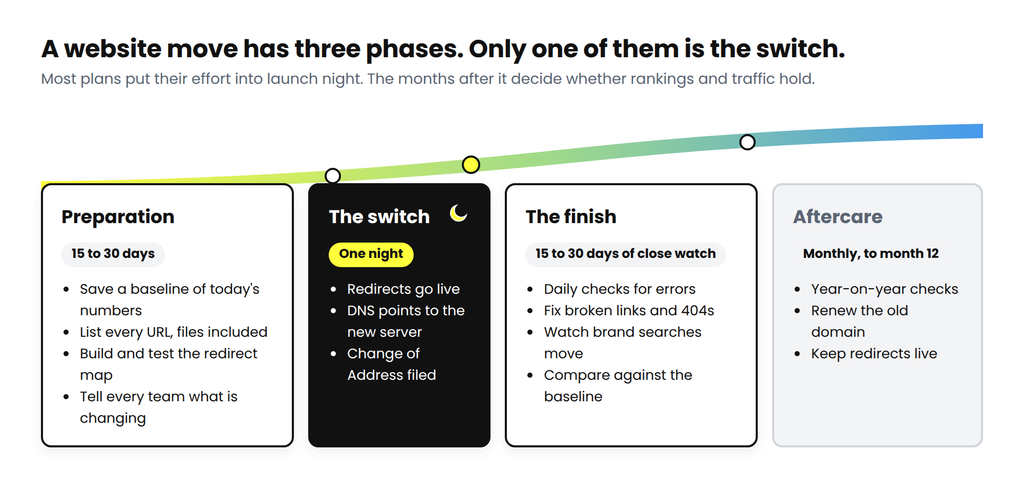
In our plans, preparation gets 15 to 30 days. The switch is a single, carefully chosen night. The finish gets another 15 to 30 days of close daily attention, followed by lighter monthly checks for the rest of the year. Each phase has its own work, and its own ways to go wrong.
The one idea every migration rests on
Before the phases, one idea is worth getting clear, because everything else depends on it.
When a page moves, its old address should not simply disappear. It should answer every visitor, whether a person or a search engine, with a short message: this page has moved permanently, and here is its new address. That message is called a 301 redirect. A browser follows it in a fraction of a second, so people rarely notice it. Google does notice it, and treats it as an instruction to pass the old page’s standing to the new one.
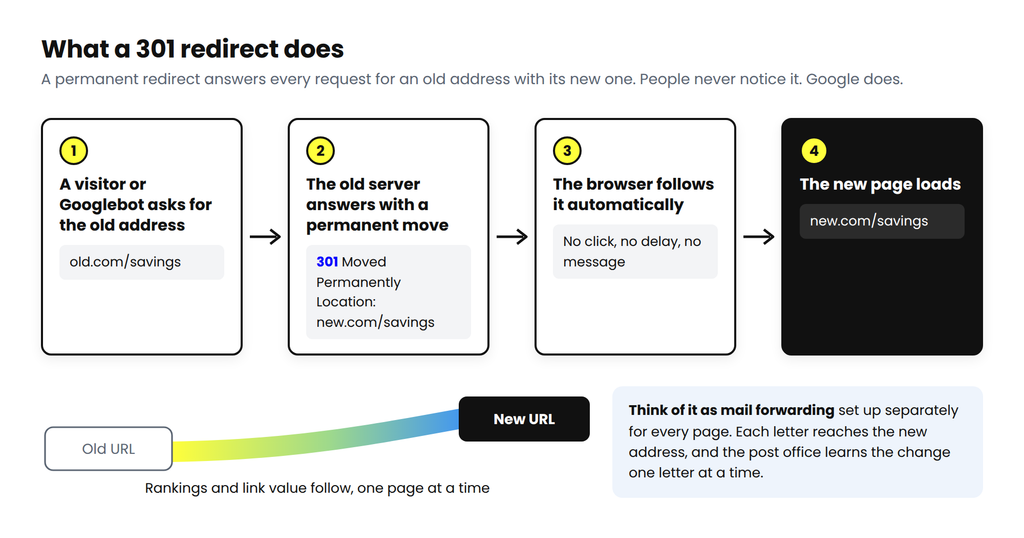
The closest everyday comparison is a mail-forwarding request, placed separately for every page on your site. Google confirms that “301 and other permanent redirects don’t cause a loss in PageRank” (Google Search Central), PageRank being its measure of the value a page earns from links. In other words, a correctly built redirect costs you nothing. Most migration problems come from redirects that are missing, point to the wrong page, or are built the wrong way.
First, know which kind of move you are making
The word “migration” covers very different projects, and they do not carry the same risk. The simplest way to see the difference is to look at the parts of a web address and ask which of them will change.
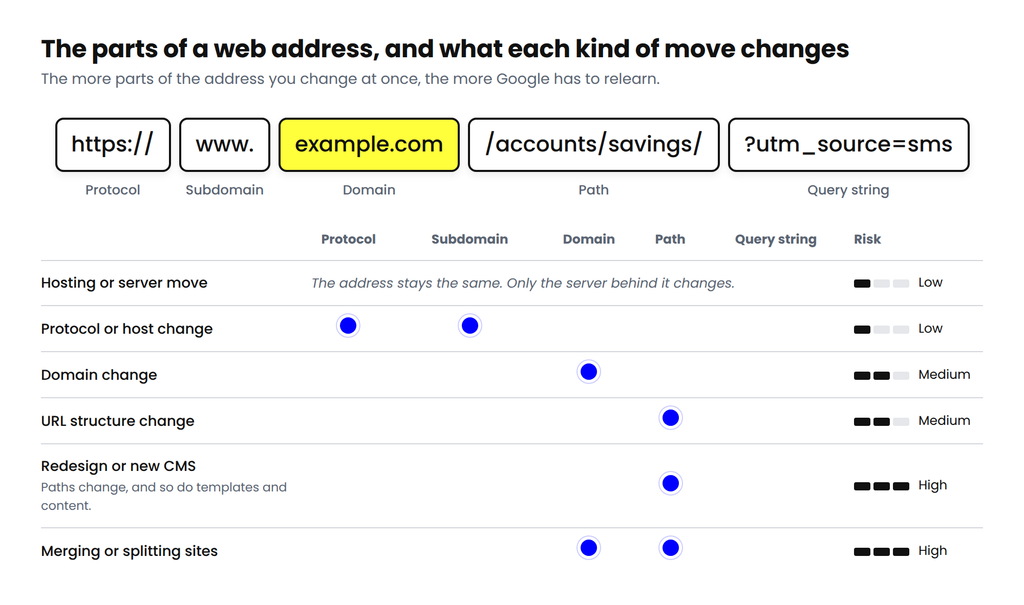
A hosting move changes nothing in the address; only the server behind it moves. Switching from http to https, or from example.com to www.example.com, changes the front of the address and keeps the rest. A domain change, like the bank’s move from capitalbank.co.in to capital.bank.in, gives every page a new domain but usually keeps the paths the same, which keeps the redirects simple. A change of URL structure keeps the domain but renames the paths, so every page needs its own mapping. A redesign on a new platform tends to change paths, templates and content all at once, and that is where most of the risk sits.
Google’s advice is to separate these changes wherever you can: “Plan your changes to your site one after the other, not everything at the same time” (Google Search Central). In practice, if you need both a new domain and a new design, move the domain first, let it settle for a few weeks, and then launch the design. When the business cannot wait, keep the content of each important page the same through the move. Google is then comparing like with like, and you can trace any change in traffic to its cause.
What to expect after a move
Most of the panic I have seen after migrations comes from normal behaviour that nobody warned the team about. A ranking wobbles, a report shows a dip, and someone asks for the old site back. It helps to share this table with everyone who will look at the numbers, before launch rather than after.
| Normal after a move | Worth a closer look |
|---|---|
| Rankings move around for a few weeks. Google’s guide tells site owners to “expect temporary fluctuation in site ranking during the move.” | Important pages drop out of Google altogether. The URL Inspection tool in Search Console shows them as not indexed. |
| Searches for your brand name show the new domain within days. | Your brand name still shows the old domain after two weeks. |
| The rest of your pages move over weeks or months. | After four weeks, old URLs are not appearing as “Page with redirect” in the old site’s Search Console. |
| Googlebot visits the new site more often than usual. | Server errors or slow responses appear in the Crawl stats report. |
| Visitors are counted under different channels in analytics for a while. | Total visits or conversions fall and stay down. |
| Average position looks worse as the new domain appears for more searches. | Clicks fall along with it. |
The first column is the normal price of moving. The second is a reason to investigate the same day.
Before the switch: the preparation phase
Preparation is where most of the work sits, and where most migrations are won or lost. On a normal project we give it 15 to 30 days. The bank’s deadline gave us about ten, which is a good test of whether a plan has its priorities right. The steps below apply to every kind of move; where one matters more for a particular kind, I say so.
Save a baseline before anything changes
The first job is to record how the site performs today. After the move, every conversation about success or failure comes back to one question: compared with what? Search Console, Google’s free tool for site owners, also does not carry the old site’s history into the new site’s account, so export it now while it is easy to reach.
- From Search Console: 16 months of queries, pages, countries and devices for the old site.
- From analytics: monthly visits by channel, and every conversion you track, whether forms, sign-ups, calls or sales.
- Rankings for your most important brand and non-brand keywords, and page speed for your main page templates.
- Your most linked-to pages, from a backlink tool such as Ahrefs or Semrush.
List every URL, including the files
Next, build a complete list of the addresses you are moving. A common mistake is to rely on a single crawl of the site. A crawler only finds pages that are linked from other pages. It misses old campaign pages, forgotten landing pages and files that people reach from emails, other websites or search results.
So we pull addresses from every source we can find and combine them: a full crawl with a tool such as Screaming Frog or Sitebulb, the XML sitemaps, every page with impressions in Search Console, landing pages from analytics, the pages other websites link to, the server’s own logs, which show what Googlebot actually requests, and an export from the content management system.
Pay particular attention to files. Google’s guidance says to “transfer images and downloads (such as PDF documents) that you host” (Google Search Central). On the bank’s website, 805 of the 1,000 addresses that earned the most Google clicks in the year after the move were PDFs: application forms, interest rate sheets and disclosures. Had we mapped only the web pages, four out of five of the addresses people most often reach from Google would have broken.
Build the redirect map
The redirect map is the most important document in any migration. It is a simple spreadsheet with one row for every old URL, and columns for the new URL, the type of redirect, the person responsible and whether it has been tested. For a pure domain change, where paths stay the same, a single rule on the server can handle every URL, and the map works mostly as a testing checklist. For a restructure or a redesign, every row is a decision.
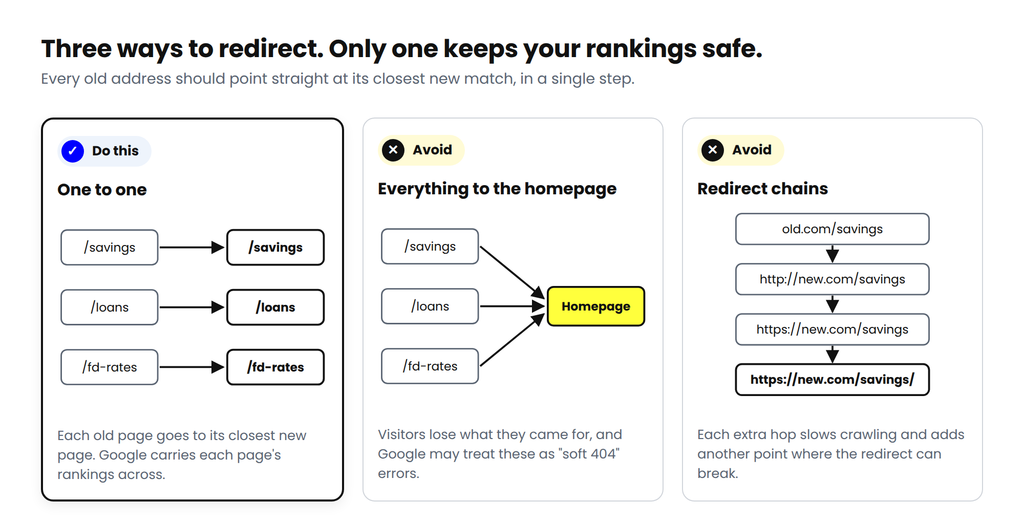
A few rules have served us well on every project:
- One old URL to one new URL, the closest match in content. It is tempting to send everything without an obvious match to the homepage. Visitors lose what they came for, and Google may treat those redirects as “soft 404s”, pages that load but do not deliver what was asked for.
- A permanent, server-side 301. Temporary redirects (302s) and redirects written in JavaScript are harder for Google to read with certainty.
- One hop only. Google’s crawlers will “follow up to 10 redirect hops” (Google), but each extra step slows crawling and adds one more place where something can break.
- Keep the query string, the part of a URL after the question mark. Campaign links tagged with ?utm_source= should arrive with their tags intact, or your campaign reports will stop adding up.
- Let retired pages say so. A page removed for good should return a 404 or 410 code unless there is a close replacement. An honest “gone” is better than a misleading redirect.
Get the new site ready for Google
While the map is being built, the new site needs to be prepared so that it sends Google clear, consistent signals from the first day.
- Internal links point directly to the new URLs, not to old ones that then redirect. The same goes for canonical tags, which tell Google which version of a page is the main one, hreflang tags, which connect language versions, and structured data.
- A fresh XML sitemap lists the new URLs only.
- robots.txt and noindex tags are checked line by line. Staging sites are usually hidden from Google, and that setting gets copied to the live site more often than anyone likes to admit. We protect staging sites with a password instead, so there is nothing to forget on launch day.
- For redesigns, the pages that already earn traffic keep their content, titles and headings, and the new templates work well on phones. On the bank’s website, two of every three Google clicks came from a mobile phone.
- Forms and conversion tracking are tested end to end on staging, before anyone talks about a launch date.
Prepare the servers and the tracking
Some of the most damaging migration problems have nothing to do with content. They sit in the plumbing.
- Lower the DNS TTL, the length of time the internet remembers where your domain points. Google suggests doing it “at least a week in advance of the move” (Google Search Central), so that the switch spreads quickly when it happens.
- Keep valid SSL certificates on both domains. The old domain needs one for as long as it redirects, or visitors following https links will see a security warning instead of your new site.
- Check that firewalls and bot protection let Googlebot through on the new server (Google Search Central). Banks and other large organisations often run strict bot rules that can block it by mistake.
- Make sure the new server can handle extra load. Google notes that “after a migration, Google will temporarily crawl your new site more heavily than usual” (Google Search Central).
- Put analytics and tag management live on the new domain before launch. If any page will remain on the old domain, it needs the same tracking code. The finishing phase below explains why.
- Verify both domains in Google Search Console, as Domain properties verified through DNS so that every version of the address is covered, and in Bing Webmaster Tools.
List every place the old address lives
Redirects take care of your own website. They cannot update the many other places where your old address is printed, stored or linked. This list needs a named owner for every line, because no single team controls all of it.
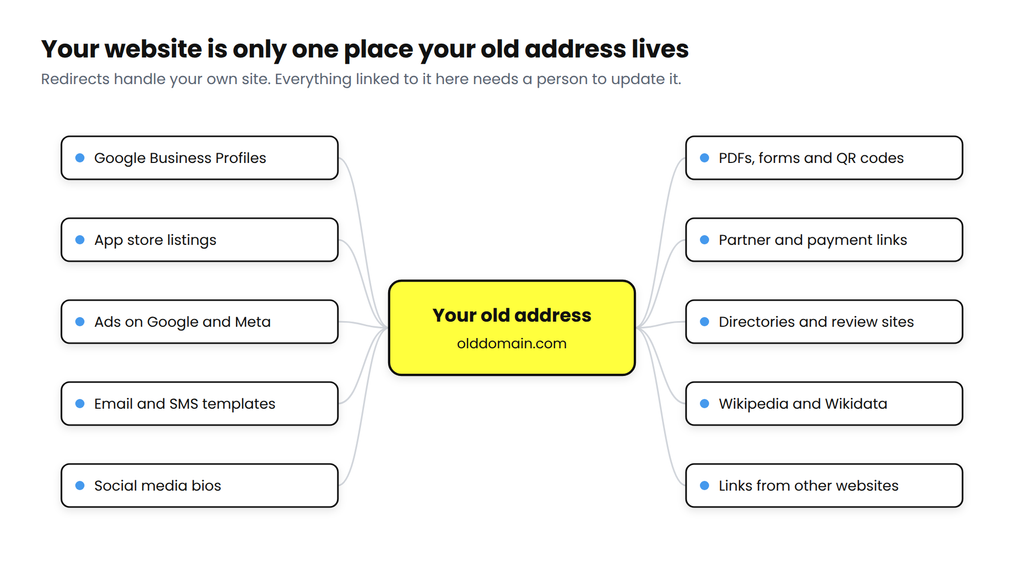
For the bank, this list ran well beyond the marketing team. It covered email templates and customer communication, social media bios, app store listings, brochures and PDFs, and third-party profiles. On most projects, it is the part that takes longest to finish, and the part most often left half done.
Preparation checklist
| Task | Done |
|---|---|
| Baseline saved: Search Console, analytics, rankings, backlinks | |
| Full URL list built from every source, files included | |
| Redirect map complete, one to one, reviewed by a person | |
| Redirect rules tested on staging: 301, one hop, query strings kept | |
| Internal links, canonicals, hreflang and structured data updated | |
| New XML sitemap ready; robots.txt and noindex checked | |
| Forms and conversion tracking tested | |
| DNS TTL lowered a week ahead; SSL ready for both domains | |
| Firewall allows Googlebot; server capacity confirmed | |
| Analytics, tag manager, Search Console and Bing set up for both domains | |
| Off-site list complete, with an owner for each item | |
| Launch window, go/no-go owner and rollback plan agreed |
Launch day: the switch
If preparation has gone well, launch day should feel almost uneventful. Pick your quietest window: for a bank, that means avoiding month-end and salary days; for a retailer, sale week; for a school, admission season. Then work down the list in order, and do not skip a check because everything looks fine.
- Put the redirects live and switch the DNS.
- Test the old homepage in all four versions: http and https, with and without www. Each should reach the final new URL in one step.
- Test your top 100 URLs from the baseline, a sample from every page template, and a sample of files.
- Check the live new site for leftover noindex tags or robots.txt blocks, and confirm that canonical tags point to the new domain.
- Submit the new sitemap in Search Console, then use the Change of Address tool in the old site’s account (Google). Use the Site Move tool in Bing Webmaster Tools as well.
- Notify IndexNow, a service that Bing and several other search engines use to learn about changed pages. Its FAQ says that after a migration “it is acceptable to submit all URLs using IndexNow” (IndexNow).
- Watch analytics in real time, and submit a test form yourself.
- Update ad destination URLs and Business Profiles the same day.
For the technical team, a domain change that keeps every path and query string can be handled by a single rule on the old domain’s server. Here it is for Apache, in the old domain’s .htaccess file:
RewriteEngine On
RewriteCond %{HTTP_HOST} ^(www\.)?olddomain\.com$ [NC]
RewriteRule ^(.*)$ https://www.newdomain.com/$1 [R=301,L]
And the same rule for Nginx:
server {
    listen 80;
    listen 443 ssl;
    server_name olddomain.com www.olddomain.com;
    # keep a valid SSL certificate for the old domain here
    return 301 https://www.newdomain.com$request_uri;
}
To test any old URL, check the status code and the address it points to:
curl -sI "http://olddomain.com/savings-account?utm_source=sms"

# Expected:
# HTTP/1.1 301 Moved Permanently   (or HTTP/2 301)
# Location: https://www.newdomain.com/savings-account?utm_source=sms
If you follow the redirect with curl -sIL and see more than one 301, you have a chain. The usual cause is an http-to-https rule on the old domain that runs before the domain rule. For restructures, the page-by-page map can live in the server configuration or in a redirect plugin on platforms such as WordPress. Server rules are faster, and they survive a future change of platform.
On the bank’s move, Google picked up the change quickly. By the second day, searches for the bank were already showing the new address, with 332 clicks to the new domain that day. Across October, the new domain held an average position of 2.6 in Google, and 30% of the people who saw it in results clicked through. For a moment, it felt finished. The next few months showed that the switch had been the easy part.
After the switch: the finishing phase
We give the first 15 to 30 days after launch close daily attention, then check monthly for the rest of the year. This is the phase most plans leave out, and it is where much of our own learning has come from. On the bank’s move, three things happened here that no launch-day checklist would have caught.
Different parts of your site move at different speeds
Searches for the bank’s own name moved to the new address within two days. Everything else took much longer. For ten weeks, the new domain appeared in roughly 6,000 to 17,000 Google searches a week, mostly searches for the bank’s name. Then, in the week of 8 December, the rest of the site began to arrive: about 60,000 impressions that week, 165,000 the week after, and 291,360 in the last week of January, around twenty times the November level.
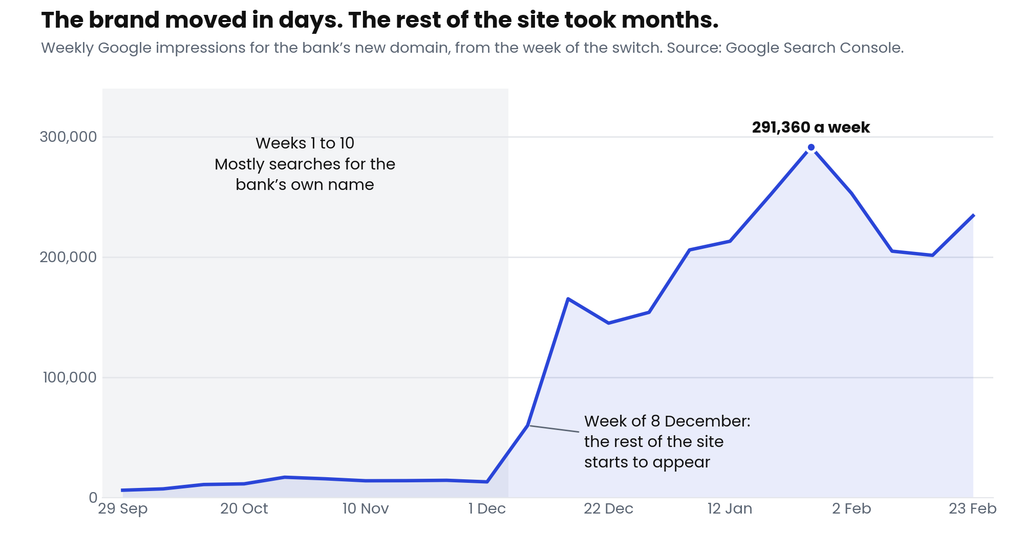
This is what SEO people call the long tail: the thousands of pages that each receive a handful of searches, such as rate sheets, forms, product pages and help articles. Together they make up a large share of a site’s visibility, but Google reaches them slowly, because it has to revisit each one. The practical lesson is to set expectations early. Judge brand searches in the first week, judge the long tail over the first three months, and do not read too much into week six.
Average position can look worse while things improve
The long tail brings a second surprise. In October 2025, the bank’s new domain had an average position of 2.6 in Google. By July 2026, that figure had slipped to 10.9, and the share of people clicking had fallen from 30% to 4.3%. On a dashboard, that looks like decline. It was the opposite: monthly clicks from Google rose from 14,215 to 26,616 over the same period.
Average position is exactly what it says, an average across every search you appear for. Think of a class of five toppers with an average mark of 95. Add thirty more students with a wide range of marks and the class average falls, even though none of the toppers did any worse. The same thing happens when a site starts appearing for many more searches, most of them lower down the page.
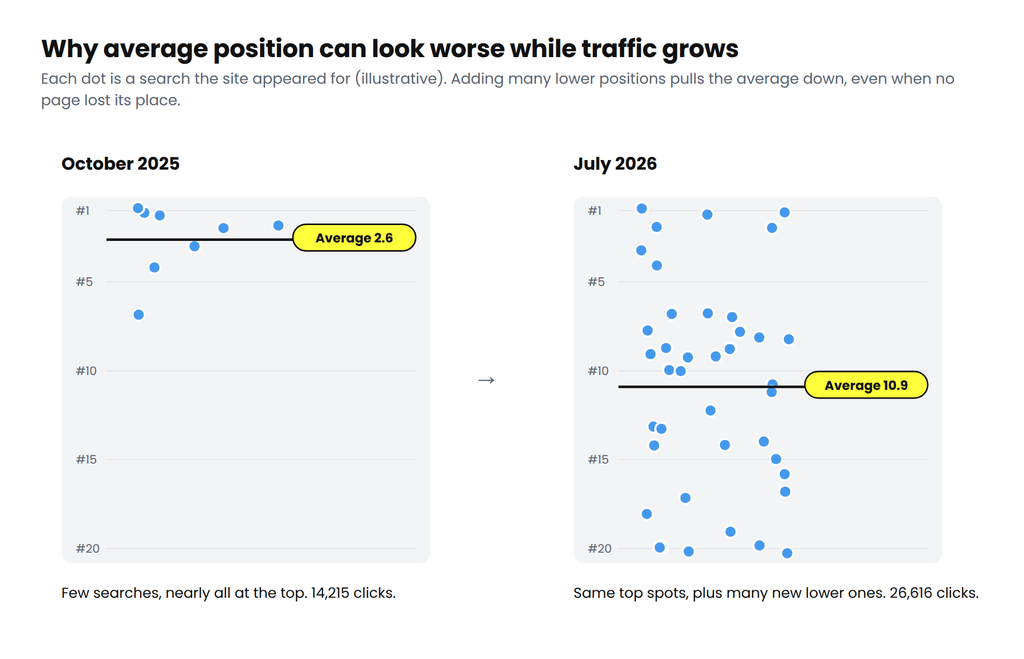
When the mix of searches changes, read clicks and conversions first, and position last.
The “we have moved” page, and what it taught us
The third lesson came from a very reasonable request. Soon after launch, the bank asked for the old address to explain the move to its customers. Instead of sending visitors straight to the new site, the old homepage would show a message saying the bank had moved, display the new address, and then forward the visitor after a few seconds. Customers who had typed the old address for years deserved that courtesy.
To a customer, a page like that is helpful. To Google, it looks different. A page that loads, shows a message and forwards after a pause is not a permanent redirect. Google’s guidance says it “interprets delayed meta refresh redirects as temporary redirects”, and it advises against relying on “we moved” pages to signal a move (Google Search Central). Over the following weeks, Google began treating the old homepage as a live page again, and searches for the bank drifted back towards it. By mid-November, weekly clicks to the new domain had fallen from about 5,200 to about 1,800.
It also confused the reports for a while. The old address carried no analytics code, so a person who clicked the old homepage in Google and was then forwarded to the new site arrived looking like a visitor from another website. For some weeks, the reports showed fewer visits from Google and more from “referral” sources. Total visits never dropped below their pre-move level. They grew through the move, from 38,722 in September to 44,102 in January. Only the labels had changed.
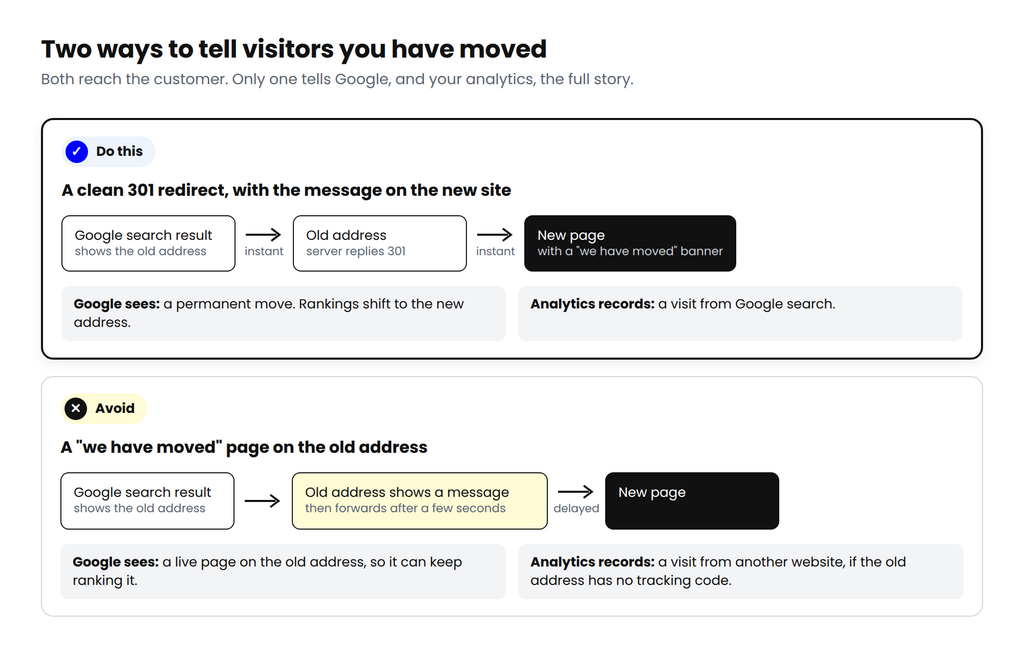
What we recommend now is simple. Keep a server-side 301 on every old address, including the homepage. If customers need an explanation, show it on the new site as a banner for visitors arriving from the old address, and tell them directly by email and SMS. The message still reaches people, Google sees a clean move, and your reports stay accurate. And during any migration, judge progress by total visits and conversions before you read the channel reports.
A monitoring routine you can copy
This is the routine we follow after every launch. It is not glamorous, but it catches problems while they are still small.
| When | What to check | Where |
|---|---|---|
| Launch day and day two | Redirect status codes and hops; 404 and server errors; robots.txt and noindex; analytics firing; a test conversion | curl or a crawler in list mode; the real-time view in analytics |
| Week one, daily | Brand searches showing the new domain; old URLs moving to “Page with redirect”; crawl errors; Googlebot visits to both domains | Search Console Performance, Pages and Crawl stats reports; server logs |
| Weeks two to four, twice a week | New 404s; redirect chains; internal links still pointing to the old domain; sitemap URLs indexed; conversions against the baseline | Search Console; crawler; analytics |
| Months two and three, weekly | Non-brand rankings and impressions; backlink updates; unexpected shifts between channels | Rank tracker; backlink tool; analytics |
| Months four to twelve, monthly | Year-on-year comparison with the baseline; old domain still redirecting; domain and SSL renewals; the address AI assistants give for you | All of the above; ChatGPT, Gemini, Perplexity |
Your old address will outlive the move
A year after the switch, people still search for the bank’s old address, or half-remembered versions of it. Searches such as “capitalbank.co.in login” and “www.capitalbank.com online banking” brought about 900 clicks to the new domain in its first year. Those visitors only arrive because the redirects are still in place.
This is why we treat redirects as permanent. Search Console’s Change of Address tool, which tells Google that a domain has moved, works for 180 days: “After the 180 day period, Google does not recognize any relationship between the old and new sites” (Google). After that, the redirects carry the move on their own. Google’s site move guide recommends keeping them for at least a year, and from the user’s point of view, for good. Links in old emails, PDFs, printed forms and other websites do not expire, and neither should the redirects that serve them. We renew the old domain and its SSL certificate every year. For a bank there is a further reason: a lapsed domain can be bought by anyone, including someone who wants to put up a copy of the old site.
The same thinking now applies to AI assistants such as ChatGPT, Gemini and Perplexity, which learn a brand’s details from the web over time. In September 2026, we asked all three for the bank’s official website, and all three gave capital.bank.in. Their answers are only as current as the sources they read: your website, your Business Profiles, Wikipedia and directory listings. So update those sources early, and check what the assistants say about your address every month.
It is worth the effort. In 2026, the bank’s website recorded 720 visits from AI assistants, and 17.4% of them ended in a submitted Apply Now form, 3.4 times the site’s average. The numbers are small, so we treat them as an early signal. It is still a signal worth protecting.
The mistakes we see most often
Across 11 years and more than 50 SEO projects, a small set of mistakes comes up again and again. We made a few of them ourselves in our early years, which is partly why this list exists.
- Sending every old URL to the homepage. Map one to one, and let pages that are truly gone return a 404 or 410.
- Redirect chains, such as old URL to http, to https, to a trailing slash. Point every old URL straight at its final address.
- Temporary or JavaScript redirects where a server 301 is possible. Google reads server-side 301s most reliably.
- Launching with the staging block still on. A single leftover noindex tag can take a site out of Google.
- Forgetting files. PDFs and images need redirects too.
- Internal links and canonical tags still pointing at the old domain. Every click then passes through a redirect, and Google receives mixed signals.
- Changing domain, design, URLs and platform in one go. When the numbers drop, nobody can tell which change caused it.
- Letting the old domain or its SSL certificate lapse. The redirects stop working and old links break.
- Removing redirects after three months. Links and bookmarks last far longer than that.
- A firewall that blocks Googlebot on the new server.
- Skipping the off-site list. Ads, Business Profiles and app listings keep sending people to the old address.
- Judging the move by one number. Week-one traffic, a single channel report or average position on its own will mislead you.
Where AI helped, and where people stayed in charge
With about ten days to prepare, we could not afford to do the mechanical work by hand. We used ChatGPT and Claude to write the scripts and read their output, alongside our usual SEO tools. This is where that helped on the bank’s move:
- The redirect map. We crawled the old site with Screaming Frog, then built a Python script that matched old URLs to new ones and listed every exception for a person to review.
- The PDF sweep. A script read the text inside the bank’s PDFs and flagged any that still carried the old address.
- Redirect testing. A checker requested every old URL and confirmed a 301, a single step and the right destination.
- Server logs. We summarised the logs to compare how often Googlebot visited the old and new domains in the first week.
- The off-site list. A first draft of every place the old address might live, which the team then cut down to what applied to the bank.
- Daily Search Console reads. Daily exports went through ChatGPT and Claude to flag unusual changes early.
- Answer checks. We asked ChatGPT, Gemini and Perplexity for the bank’s website, and we still do.
One rule held throughout: the tools proposed, and a person approved every redirect. They were fast at matching, checking and summarising. They could not judge what the bank needed, such as which old rate sheet should point to the current one, or when customers deserved an explanation. That judgement stayed with people, and I think it always should.
One year on
A year after the switch, the move is finished, and the numbers that matter to the bank tell a clear story.
- Total website visits for June to August 2026 were 26% higher than in the same months of 2025: 151,534 against 120,108.
- July 2026 was the busiest month since the site began tracking in Google Analytics 4 in early 2025, with 53,046 visits.
- In its first year, the new domain earned about 249,000 clicks and 6.6 million impressions in Google search.
- Three of every four Apply Now forms submitted on the site come from organic search.
That last point is the one I would underline for any business planning a move. When most of your applications, leads or sales begin with a search, changing your website’s address is not only an IT task. It touches revenue, and it deserves the same care as any other decision that does.
What Google says, and where to read it
Google’s own documentation is the best free migration guide there is, and it matched what we saw on the bank’s move. Four pages are worth bookmarking before you start:
- How to move a site with URL changes: the main guide for domain changes and restructures, from mapping URLs to monitoring. It is also where Google says to change one thing at a time.
- Redirects and Google Search: which redirect types Google reads, ranked by how reliably it reads them. The advice is to “use a permanent server-side redirect whenever possible.”
- Change of Address tool: how to tell Google your domain has changed. Its effect lasts 180 days, so the redirects have to carry the move after that.
- Changing your hosting: for server moves where the URLs stay the same, including DNS and firewall checks.
For teams thinking about answer engines as well, Google’s optimisation guide for its generative search features says that “optimizing for generative AI search is optimizing for the search experience, and thus still SEO” (Google Search Central). The basics that protect your rankings through a move also protect your place in those answers.
The fundamentals have not changed
Every migration we have handled, large or small, comes back to the same few things. Map every URL. Redirect it once, permanently, to its closest match. Tell every system and every customer that the address has changed. And keep watching long after launch night, because that is when Google does its part of the work.
The switch is an evening’s work. The finish is where rankings, traffic and customer trust are either kept or lost.
That is how we approach website work at Adtric, India’s AI-first brand growth partner. Tools take on the repetitive load, so our people can spend their time on the judgement calls that decide the outcome. It is what we mean by Performance, Simplified.
Frequently asked questions
Plan 15 to 30 days for preparation, one night for the switch, and 15 to 30 days of close monitoring afterwards. Google keeps processing the move for weeks or months after that, so keep checking monthly for a year.
Some movement in rankings is normal, and Google says so. With a complete one-to-one redirect map and close monitoring, any dip can be kept short. Judge the move on total visits and conversions, not on a single channel report.
Google recommends at least a year, and from the user’s point of view, for good. We keep them permanently and keep renewing the old domain and its SSL certificate.
Not on the old domain. Google treats a page that forwards after a delay as a temporary redirect. Keep a server-side 301 and show the message as a banner on the new site instead.
Google advises making changes one at a time. If you must combine them, keep each important page’s content the same through the move, so that any change in traffic can be traced to its cause.
Yes, over time, from the search indexes and sources they read. Update your Business Profiles, directories and knowledge sources such as Wikipedia, then check the address the assistants give every month.